Give big files more lanes.
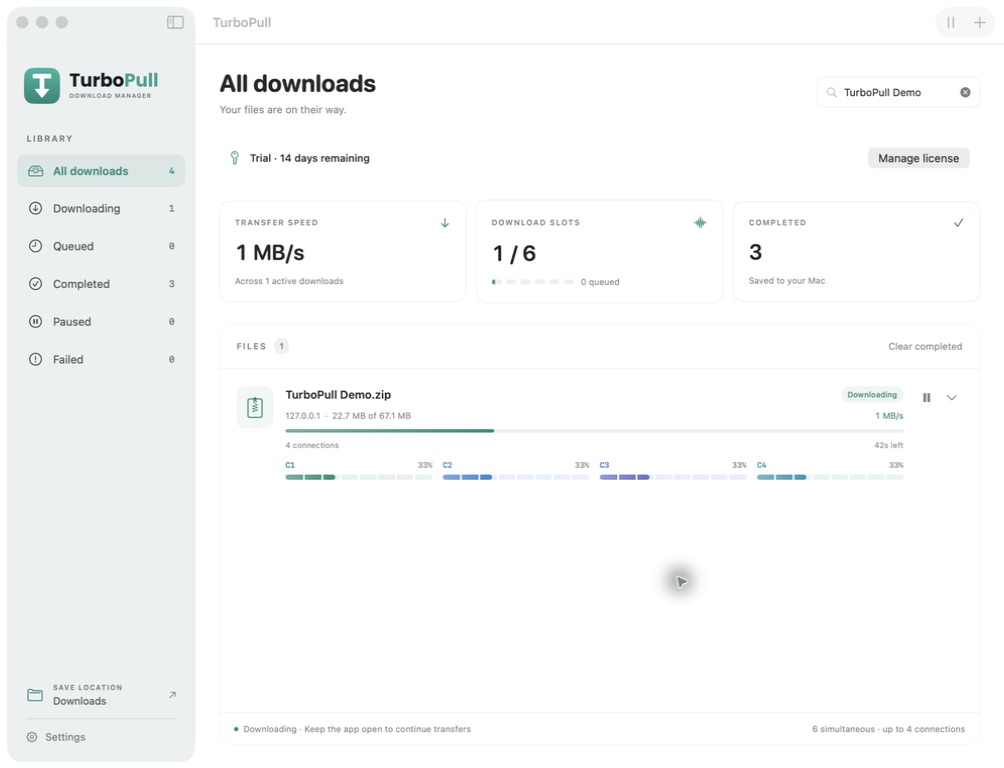
Use up to 8 parallel connections per file and run up to 6 downloads at once. Follow each connection as it progresses.
Available speed depends on your connection and the source server.
 Download trial
BUILT FOR YOUR MAC
Big files. Favorite videos. One calm place to manage them all.
Meet TurboPull, the native Mac download manager with parallel connections, clear progress, and pause that picks up where you left off.
14 days free · No card required · macOS 14+
SEE IT IN ACTION
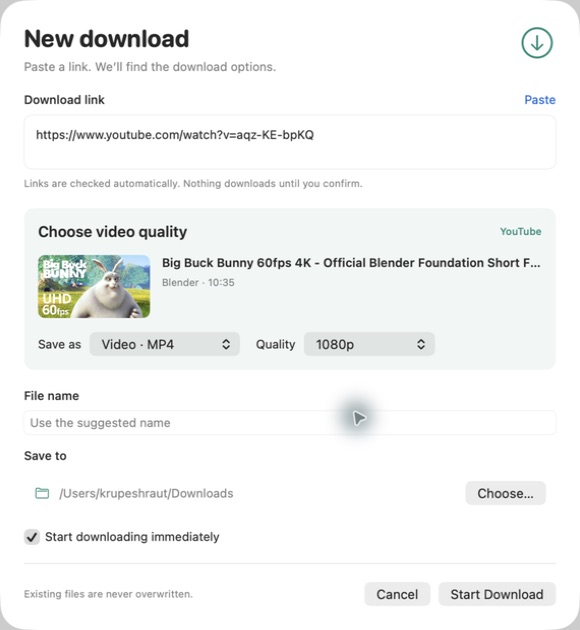
Follow four connections, pause and resume, then choose the available quality for a public video.
Paste a file link and review its options. Four connections show their individual progress. Pause the transfer, then resume the same file from its saved progress. For a supported public video, inspect the available options and select 1080p. Later, the completed file appears in the library. Try TurboPull free for 14 days, with no card required. Requires macOS 14 or later. The launch license is $19.99 USD, one-time.
Video sample: Big Buck Bunny, © 2008 Blender Foundation / bigbuckbunny.org, CC BY 3.0. Thumbnail and title shown inside the app; no film footage or audio is included.
A LITTLE MORE CONTROL
Start a download and keep your day moving. TurboPull brings the details into view when you need them.
Use up to 8 parallel connections per file and run up to 6 downloads at once. Follow each connection as it progresses.
Available speed depends on your connection and the source server.
Pause, close the app, and come back later. TurboPull saves partial downloads and resumes where the source allows it.
Changed files or unsupported servers may need a fresh start.
Keep files and public videos in one library. Choose where they go, manage your queue, and find completed downloads quickly.
Files download directly to your Mac.
THE LINK IS THE START
Paste a supported public video link, preview the available quality, and save an MP4 video or M4A audio file to your Mac.
For content you own or have permission to download. Individual public videos only. Availability varies by link, region, and platform; private, DRM-protected, and live content is not supported.
OWN YOUR DOWNLOAD MANAGER
A straightforward license for your MacBook and your desktop. No monthly subscription.
Planned regular price: $29.99 USD
Verify your email to try every feature free for 14 days. Marketing emails are optional. Applicable taxes are shown at checkout. Future major upgrades will be optional paid purchases.
A FEW GOOD QUESTIONS
Download TurboPull now for Apple silicon or Intel Macs running macOS 14 or later. Verify your email in the app to start a free 14-day trial without a card. Marketing emails are optional. Purchase a license when you want to keep downloading; there is no automatic charge.
No. The $19.99 launch purchase covers one person on two Macs and a permanent license for TurboPull 1, including its 1.x updates. A future major version may be a separate, optional paid upgrade. Your existing license will not expire if you decline an upgrade.
No. Support covers individual public videos from YouTube, Facebook, TikTok, and Instagram, subject to availability and platform restrictions. Some public links still require verification. Private videos, live streams, playlists, and DRM-protected content are outside the current scope. Platform changes can require app updates.
Downloads run while TurboPull is open and your Mac is awake. Quitting pauses active transfers. Resuming reuses saved partial data where the source permits; some changed or expired sources may restart.
TurboPull requires macOS 14 or later and supports Apple silicon and Intel Macs. The installer includes the video tools it needs; no Terminal or Homebrew setup is required.
They stay in the folder you choose on your Mac. Removing a completed entry from TurboPull's history keeps the saved file. Removing an unfinished download discards its partial files.

NEXT STOP: YOUR MAC
Start your free 14-day trial. No card required. Buy once when you’re ready to keep TurboPull.