
Two settings, two different jobs
| Setting | What it controls | TurboPull limit |
|---|---|---|
| Parallel connections | Separate parts of one file requested from its source | Up to 8 per file |
| Simultaneous downloads | Separate download items active together | Up to 6 items |
What do four connections and two downloads mean?
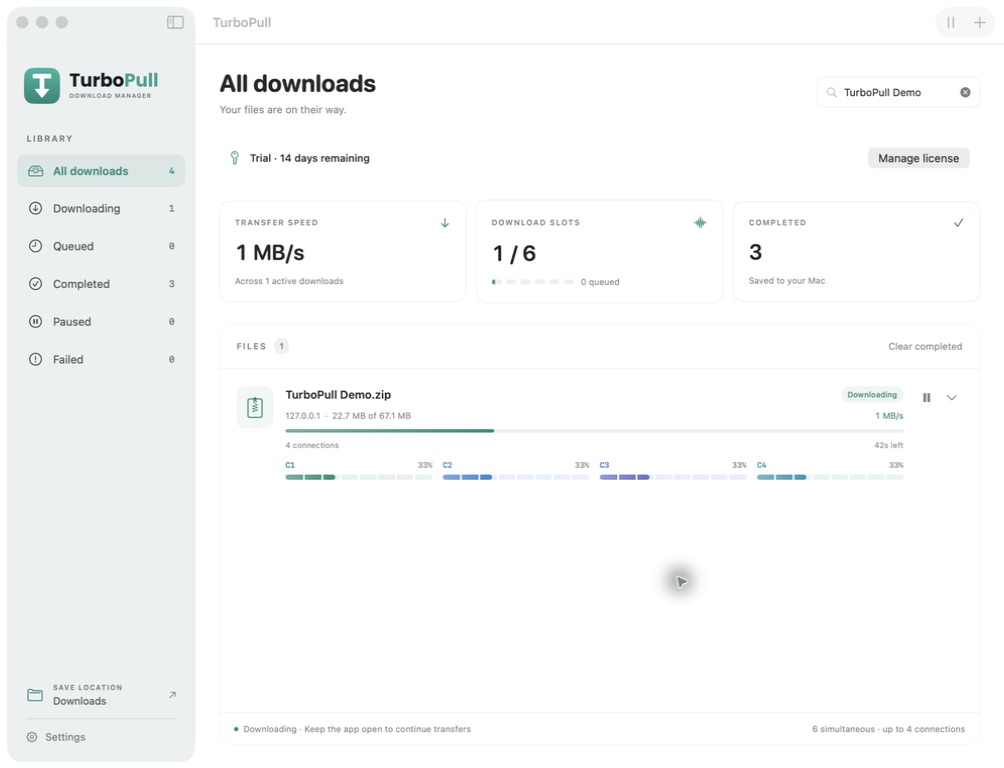
Imagine you add two large ZIP files. With two simultaneous downloads, both files can run together. If each source supports splitting the file into four parts, each file can use up to four connections: up to eight in total for the two files.
This describes the configured maximum, not a promise that every connection stays active. Server support, file size and the stage of a transfer can reduce the number actually doing work. Public videos can follow a different transfer and merging process.
Will more connections make downloads faster?
Sometimes a source handles several requests more efficiently than one. But every connection still shares your available internet bandwidth. A source’s rate limit, Wi-Fi quality, disk speed or server load may be the real constraint.
A server that does not support partial-file requests may use a single transfer. More connections can also add overhead or lead to source throttling. There is no fixed speed multiplier.
A practical way to choose settings
- Begin with a small number. Try two simultaneous downloads and two or four connections per file.
- Change one setting at a time. Compare similar files from the same source while other network activity stays similar.
- Watch stability as well as speed. If failures increase, or calls and streaming suffer, reduce the number of active downloads or connections.
- Use the queue. Additional files can wait while your active downloads finish.
Treat a short test as guidance for that source and connection. A different server, time of day or network can behave differently.
What happens when I pause?
Pause stops work on the item while preserving available partial data. Resume the same item later to reuse that progress where the source permits. Read the guide to resuming downloads on Mac →